| CAPTCHA FREE WEBSPACE!  |

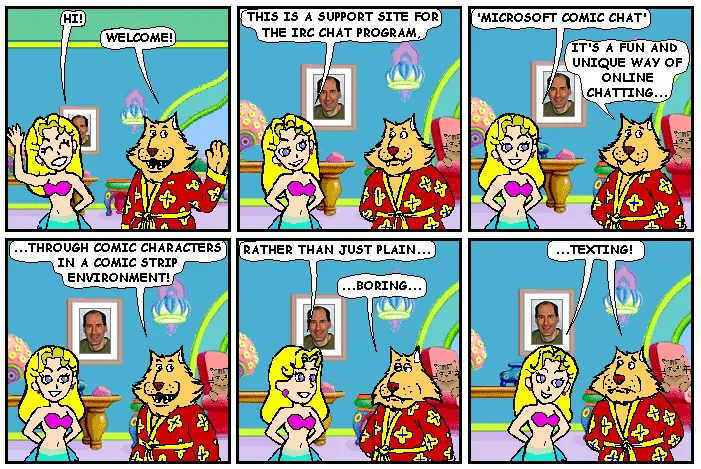 |
Microsoft Comic Chat still works, EVEN in Windows 11!
In February of 2001, Microsoft closed the default servers for the program!
Therefore one must connect to their own favorite IRC chat server!

|
  Mermaid character mmd.avb originally created Nov '97 by 'ToyPoodle' Adopted by Mermaid_Elizabeth Dec 1997 |
| ||||||||
 |
||||||||||








Looking for a long-lost Comic Chat character? Click HERE!




Comic Chat

 |
MadMax's Crypthome Presents: Gallery of Comic Chatters |
| This site is created and maintained by: Mermaid_Elizabeth with MS NotePad Page updated: 25 January 2025 
|
 |



| More Information about Comic Chat from the Author of the Program: | |

DJ On-Board ship in Antartica |
David Kurlander, (DJ), the author of the Microsoft's Comic Chat program, retired in 2008 from Microsoft. Upon returning from an expedition to Antarctica and South Georgia, (the trip of a lifetime), he created a website to which he added a section that is very informative and useful for persons interested in the Comic Chat program: http://kurlander.net/DJ/Projects/ComicChat/resources.html. DJ also has a great step-by-step "Getting Started" instructional page: HereBesides having some great publications available about Comic Chat, DJ also has a few videos that would help a Comic Chat beginner: http://kurlander.net/DJ/Videos/ComicChatVideo.shtml. |
| |||
Also Chat in Ubuntu Linux   |
|||
| So after reading all of this and seeing that Microsoft had abandoned this program as a cost saving decision back in February of 2001. (They abandoned several of their "free service" programs all at the same time) (V-Chat, Comic Chat, and MS Agent, and maybe a few others). One can ask, why does Mermaid Elizabeth continue to support a seemingly dead program? (It's NOT really dead! Just the servers it connects to by default are dead!) | |||
 |
Well, stepping out of the "third person", the short answer is that I love this program! IT STILL WORKS! It is sooo much better to chat in it than using text chatting methods. I know everyone today has cell phone texting, but this program takes chatting to a more fun - more awesome level! Texting on the phone is mostly one-on-one, but there is a much more dynamic conversation going on in a room filled with other folks from around the world. (It would be real cool if someone could make an app for the cell phone that would simulate this communication style! ...Microsoft does have several patents on this program, through DJ's wizardry, so the app programmer would have to clear it with them, Or get them involved)! |
||
|
Comic Chatting makes it easier to see who is talking to who as well. In a text chat room, it is confusing sometimes when you can't tell who is saying what to who/whom...whatever, (Im an electrican, not an English major!)! I spent 2 years in AOL chat rooms before discovering Comic Chat. A control room operator at a power plant where I was working at the time (SEGS 8 & 9), told me about Comic Chat. WOW! I am done with text chat! ...So I spend my money and time preserving this program and all that I can recover in hopes that one day others will re-discover the awesomeness of this wonderful, fun, exciting method of communicating.
You know I once got an email from a US Marine Corps guard at Guantanamo Bay. They were using the program in TEXT mode to record their watch logs. All of their stations were connected together using the Comic Chat program. You see, in Comic Chat, one can save the entire log of events. He wanted to know if there was anyway to record a time stamp on each message. It was unfortunate that I did not know the answer, but I often thought that their unique use of the program was quite clever! Now today in 2022, I understand that one can write a rule in the Comic Chat program that will ping and report the time whenever anyone speaks in the room. (Under View\Automation\Rules\Add Rule). I would like to also add ...Although DJ received 2 patents for this program, anytime you work for a corporation, the patents you get ultimately belong to the company. They make big gestures to recognize the person, give them plaques in front of team audiances, put their names on a big board in the common room or in the main hall, but in reality, the patent stays with the company! So please, don't contact DJ in hopes that he can change the program in anyway! Only Microsoft can legally do that! The same goes with the 16-bit Character Editor. A totally different team built it, (led by Jim Campbell), so DJ cannot help us updating it to a 32 bit program. So please, if you want to contact DJ, contact him with KUDOS for making this awesome Comic Chat program only! Save the rest of your comments and ideas for Microsoft directly! DJ's retired! ...as am I!
| |||

Our Sponsor:  |
|||||
 |
|||||
 |
|||||
 Search Engine Optimization |
|||||